Variables
What are Variables?
Variables serve as dynamic placeholders within a strategy to store numeric values that can be shared across conditions and updated during execution. They allow you to move beyond static logic and build strategies that "remember" previous states, such as an entry price or a trade count.
Core Concepts
What Variables Do
| Feature | Description |
|---|---|
| Named Reusability | Declare a value once (e.g., Tradecount) and reference it in multiple nodes. |
| State Management | Track counts or previous price levels to coordinate Entry/Re-entry logic. |
| Strategy-Wide Scope | Unlike indicators (which are data-dependent), variables exist across all legs and conditions. |
| Code Export Ready | Maps directly to Python properties for advanced customization. |
Where to Use Variables (Examples)
- Condition Comparisons: Max loss/profit targets.
- Action Configurations: Target/Stop Loss values.
- Indicator Comparisons: Compare indicator values against thresholds.
- Trade Limits: Control maximum entries per day.
How to Create a Variable
Step 1: Open the Builder
Navigate to the dashboard builder page and open an existing strategy or create a new one.
Step 2: Add a Variable
In the left sidebar, locate the Variables section and click the + icon.
Step 3: Configure Properties
- Name: A unique identifier (e.g.,
riskPct,maxLoss,tradeCount). - Value: Enter a numeric literal (e.g.,
3,0.5,100,-3000).
Step 4: Add to Strategy
Click the + button. The variable is now ready to be referenced in conditions and actions.
Strategy Implementation Examples
Example 1: Counting Trades (Daily Limit)
Objective: Limit the number of trades taken in a day (e.g., max 3 trades).
Variables
| Name | Value | Purpose |
|---|---|---|
maxTrades | 4 | Daily trade limit |
tradeCount | 0 | Running counter |
Logic Setup
Entry Condition:
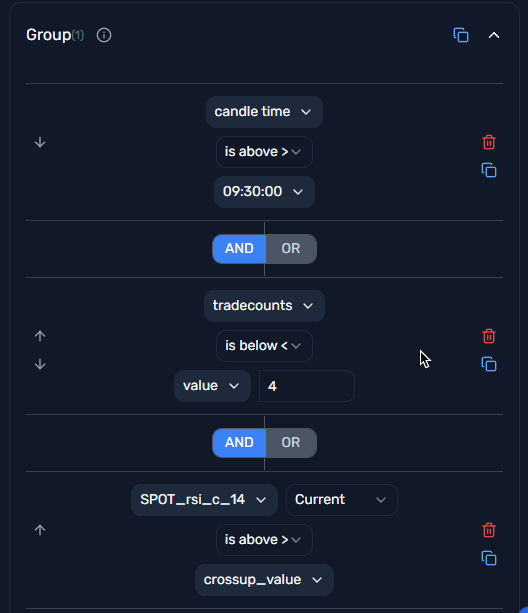
- Here we are checking if tradecount is less than max trades and if the RSI is greater than 60.
tradeCount < maxTrades AND RSI > RSIvalue
Action:
- We are adding a leg to the strategy.
- Here we are incrementing the tradecount by 1.
tradeCount = tradeCount + 1

Example 2: Spot-Based Straddle Shifting
Objective: Set the Spot Price at 09:30 AM, then shift the straddle every time the spot moves 100 points until the end of the day.
Variables
| Name | Value | Purpose |
|---|---|---|
spotBase | 0 | Reference point for the next shift |
Logic Setup
Entry Condition:
Position == [] AND Time >= 09:30:00
Entry Action:
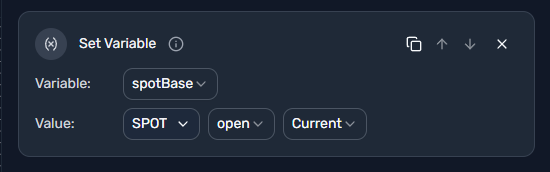
Set Variable:spotBase=SPOT.open.currentAdd Leg: Sell ATM CE & PE

Exit Condition (OR):
Time >= 15:15:00ABS(SPOT.open.current - spotBase) >= 100
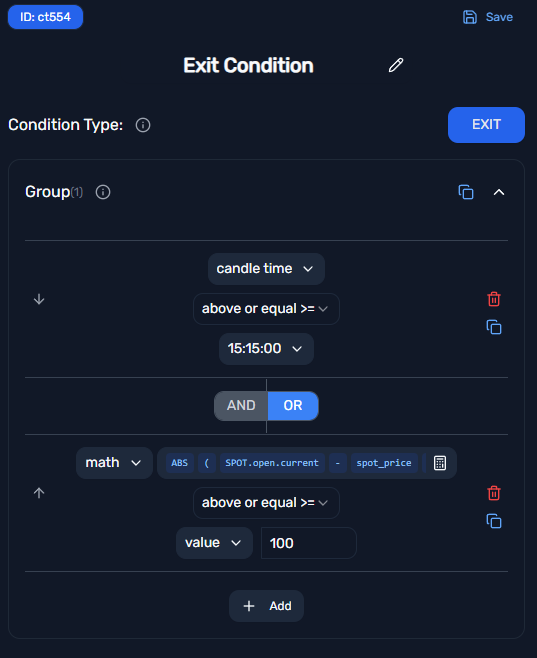
Note: Because the Entry Condition checks for an empty position, the strategy re-enters and resets the
spotBaseautomatically after every 100-point exit (shift).
Example 3: Combined Premium SL on VWAP Entry
Objective: Enter a straddle when Combined Premium is below VWAP. Set SL at 5% of the entry premium or if premium crosses back above VWAP.
Variables
| Name | Value | Purpose |
|---|---|---|
entryPremium | 0 | Captured at the moment of entry |
Logic Setup
Indicator: Apply VWAP to the Combined Premium data point.
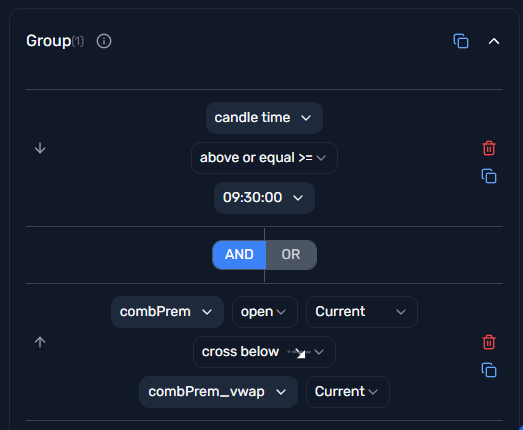
Entry Condition:
Position == [] AND Time >= 09:30:00 AND Combined Premium < Combined VWAP
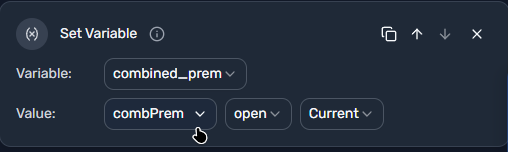
Entry Action:
Set Variable:entryPremium=Combined Premium.open.currentAdd Legs: Sell ATM CE & PE
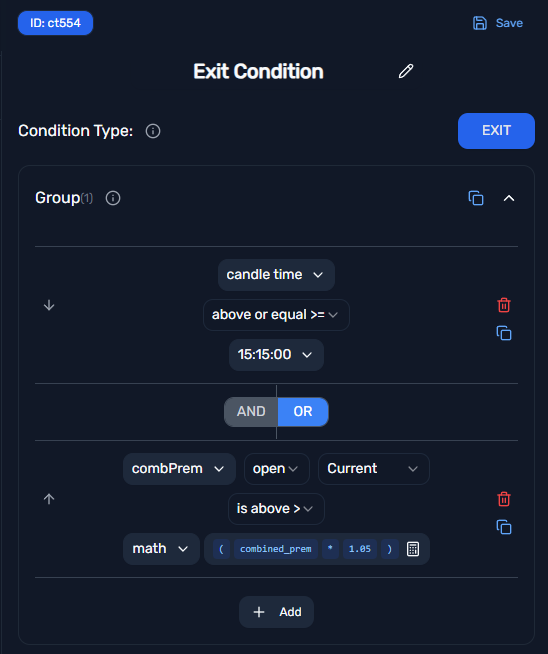
Exit Condition (OR):
Time >= 15:15:00Combined Premium > (entryPremium * 1.05)(5% SL)
Best Practices
1. Use Semantic Names
✅ maxIntradayLoss, scalpingLot, vwapDeviationLimit
❌ var1, x, temp
2. Action Order Matters
Always place the Set Variable block as the first step in an Entry Action. This ensures your Stop Loss or Shift logic is measured against the exact entry fill price.
3. Centralize Tunable Parameters
Any value you expect to tweak (max loss, max profit, target/SL, etc.) should be a variable. Avoid hard-coding literals in multiple nodes.
4. Use Absolute Math
When measuring price distance, use the ABS (Absolute Value) function to detect moves in both bullish and bearish directions.
5. Plan for Code Export
If you plan to modify the generated Python code, align variable names with how you would reference them in code (e.g., maxProfitVar, niftyEntryPrice).
Common Patterns
| Pattern | Variables Needed | Use Case |
|---|---|---|
| Trade Limiting | maxTrades, tradeCount | Control daily exposure |
| Price Anchoring | entryPrice, spotBase | Track entry point for SL/Target |
| Premium Tracking | entryPremium | Option premium-based exits |
| Profit/Loss Targets | maxProfit, maxLoss | Simple P&L-based exits |
Quick Reference
Variable Creation:
1. Go to Variables section in sidebar
2. Click + icon
3. Set Name (unique identifier)
4. Set Value (numeric only)
5. Click Add

Usage in Conditions:
- Compare indicators/data against variable values
- Use in mathematical expressions
- Combine with AND/OR logic

Usage in Actions:
- Set Variable to update values during execution
- Reference in Target/SL configurations