Jainam Prop Server C
How To Connect Your Jainam Prop Server C Account?
Buildalgos.com simplifies algorithmic trading by offering easy integration with multiple brokers, including Jainam Prop Server C.
This guide walks you through the steps to connect your Jainam Prop Server C account with Buildalgos, enabling you to automate your trading strategies effortlessly.
Step 1: Add Broker
- Go to https://buildalgos.com/dashboard/brokers
- Click Add Broker
- Select Jainam Prop Server C from the list.
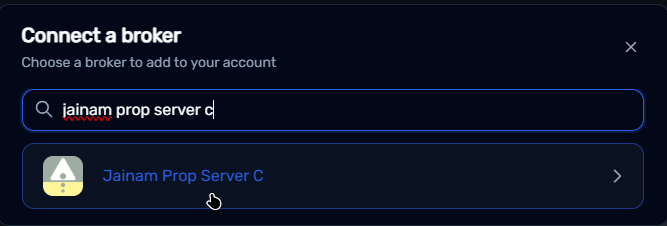
Step 2: Enter Credentials
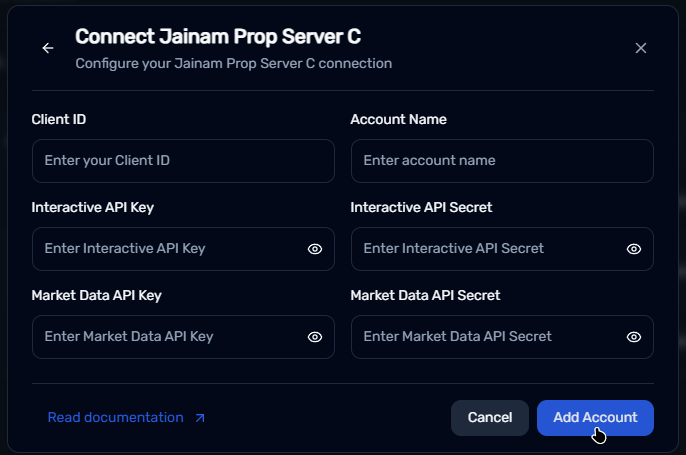
- Client ID → Your Jainam Prop Server C account Client ID
- Account name → Enter a name of your choice. This will serve as your Jainam Prop Server C display name on the BuildAlgos platform.
- Interactive API Key → Your Jainam Prop Server C account Interactive API Key
- Interactive API Secret → Your Jainam Prop Server C account Interactive API Secret
- Market Data API Key → Your Jainam Prop Server C account Market Data API Key
- Market Data API Secret → Your Jainam Prop Server C account Market Data API Secret
- Click Add Account.
Step 3: Start Trading!
- Once your broker is added, it will appear in your dashboard. Click Login.
- You will be redirected to the Jainam Prop Server C website — enter your login details.
- After successful authentication, Buildalgos will show “Logged In Successfully”.
- To start trading, click the Play icon under the Trade column.
- To stop/pause trading, click the Pause icon under the Trade column.
- Your Jainam Prop Server C account is now fully connected to Buildalgos!
By completing the steps in this guide, you've successfully set up your Jainam Prop Server C account to work with Buildalgos. You're now ready to optimize your strategies and make smarter, data-driven decisions. If you need help or run into any issues, feel free to consult the Buildalgos resources. Happy trading!