Backtesting
Before taking any strategy live, it’s crucial to understand how it would have performed in past market conditions.
This is where backtesting comes in.
Our platform offers a powerful backtesting engine that simulates your strategy’s performance on historical data—helping you validate logic, assess risk, and optimize parameters before risking real capital.
Why Backtesting Matters
With backtesting, you can:
- Analyze win rate, average return, and drawdowns
- Compare results across different instruments and timeframes
- Iterate and improve strategy logic based on insights
Whether you're building with no-code blocks or writing Python code, every strategy can be backtested with just a few clicks.
Running a Backtest
Once your strategy is saved, you can easily backtest it to evaluate historical performance.
To begin:
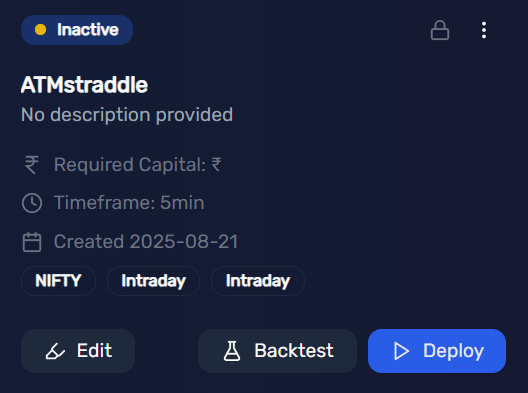
- Navigate to My Strategies under the Strategies menu.
- Locate your strategy and click the Backtest button.
- Choose your desired start date and end date for the backtest period.
- Click Start Backtest.
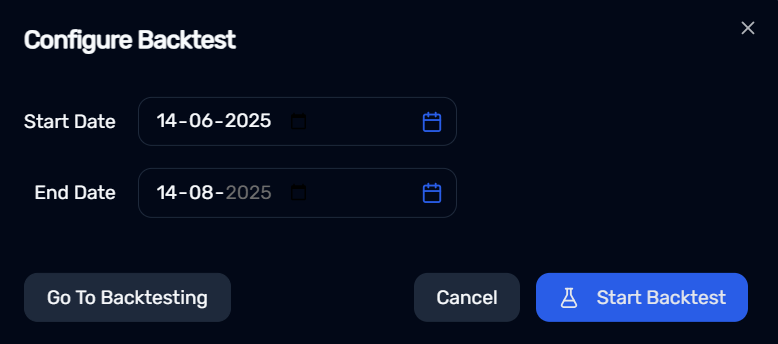
The platform will process your request, and results will be available within a few minutes under the Backtest tab in the Strategies section.
Review Backtest Results
This feature allows you to review:
- Entry and exit points
- Strategy-level performance metrics
- P&L trends over time
- Execution logic accuracy
Backtesting helps you validate your strategy logic, fine-tune parameters, and build confidence before going live.
Detailed Analysis
Once your backtest is complete, click on View Backtest to access the full analysis.
This section provides a detailed breakdown of your strategy’s performance, including key metrics, charts, and trade summaries.
For a deeper dive, navigate to the Trades tab (next to Overview). Here, you can review:
- Individual trade logs
- Entry and exit timestamps
- Instrument details
- P&L for each trade
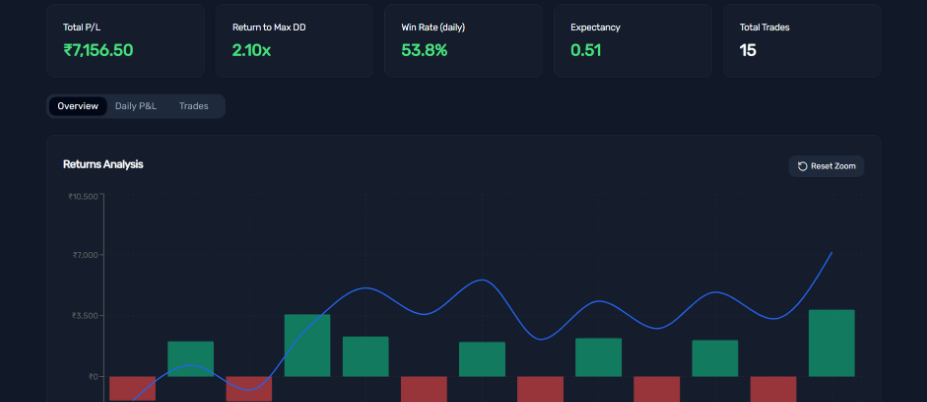
This comprehensive view helps you assess how well your strategy performed and identify areas for refinement before going live.