Portfolio & Monitoring
The Monitor page serves as the live dashboard for all your deployed strategies. It provides real-time visibility into your strategy’s execution status, performance, and associated account details—all in one place. You will find it under the Trading menu.
Key Components
- Strategy Name – The name you’ve assigned to your strategy. Click to view details and execution logs.
- Account Name – Shows which broker-linked account is being used for live trading.
- Multiplier – Indicates the quantity multiplier applied at deployment. Blank means default sizing is used.
- Error Status – Displays any runtime errors or warnings. If no errors occur, this remains empty.
- Strategy Status – Reflects whether the strategy is currently Active, Paused, or Stopped.
- Link Status – Confirms if the broker account and strategy link is connected. A green Active tag means all systems are live.
- Open P&L – Shows real-time mark-to-market profit or loss from open trades.
- Booked P&L – Displays realized profit or loss from closed trades.
- Total P&L – Sum of Open and Booked P&L, giving an overall view of performance.
Actions
- Pause Button – Serves as the Deactivate Strategy function. Clicking it disconnects the active link between your strategy and the connected broker account, halting live order execution.

- Stop & Redeploy – To reconnect and resume:
- Click the Stop button to fully terminate the current session.
- Once the strategy status changes to Stopped, click the Deploy button to reinitiate execution.
- To redeploy the strategy, click the Play button under the Actions column, then select Deploy to initiate the deployment process.
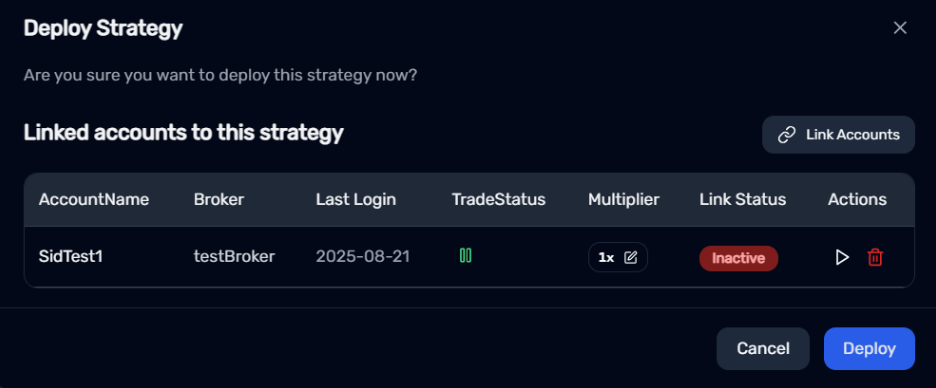
This process ensures a clean and secure re-connection to your broker account.
-
Square-Off (Crossed Checkbox) – Triggers an immediate square-off of all open positions associated with the strategy.
- This action forcibly exits all active trades, regardless of target or stop-loss conditions.
- Intended for quick manual intervention when needed.
-
Delete Button – Permanently removes the connection between your strategy and the linked broker account.
⚠ Important Notes:- This action is irreversible. You will need to re-establish the broker connection from scratch to resume live trading.
- You cannot delete a broker link while the strategy is active. Ensure the strategy is stopped first (from Deploy Strategies or My Strategies).
This safeguard ensures live trades are not disrupted unintentionally.
Portfolio Overview: Account-Level Actions
The Portfolio Overview section provides action buttons that apply to your entire trading account—not just individual strategies.
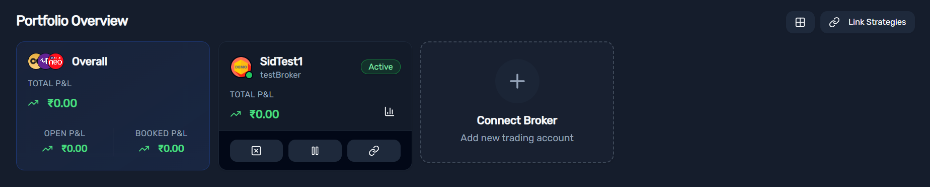
For example, if you have multiple strategies (e.g., 3) running under the same broker account:
- Square Off – Closes all open positions across all linked strategies for that account.
- Deactivate – Stops all active strategies associated with that specific broker account.
- Link Icon – Allows you to connect or disconnect strategies to/from this account.
- Chart Icon – Opens detailed account-specific analytics, including performance metrics, P&L breakdowns, and strategy-wise summaries.
⚠ Use these actions carefully: they affect all strategies linked to the selected account simultaneously.
This centralized control is designed for traders who manage multiple strategies under one broker login and need efficient portfolio-level management.